

How Interactive Game Floors Work: LED Tiles, Sensors & the Controller
A play surface of light-up LED tiles reacts to every step. Players chase lit targets, memorize color sequences, and race each other across the surface — the floor itself is the game board. This guide explains the architecture from the manufacturer’s side: what each LED tile contains, how the system detects a footstep, and how the controller turns hundreds of tiles into one coordinated game.
For family entertainment centers (FECs), arcades, and other active-play venues, understanding these components helps buyers evaluate game performance, maintenance needs, and system compatibility before choosing a floor. Explore the Interactive Game Floor system to see how these components come together in a commercial installation.
In this guide: What it is · The 3 core components · How a step triggers the response · Wall & room integration · Game modes · Installing the tile grid · Maintaining · What buyers should know · FAQ
What Is an Interactive Game Floor?
An interactive game floor — also called an LED game floor — is built from modular LED tiles, not a projected video and not a plain light-up dance floor. Each tile is a sealed, load-bearing light cell that players walk on directly. A sensing layer detects steps, and a central controller runs the game software that decides how the tiles light up. The result is a floor players control with their feet — the core attraction of an active-game room.
The 3 Core Components of an Interactive Game Floor
A complete interactive game floor system is built from three layers: the tiles that display, the sensing that detects, and the controller that decides.
Interactive Game Floor LED Tiles
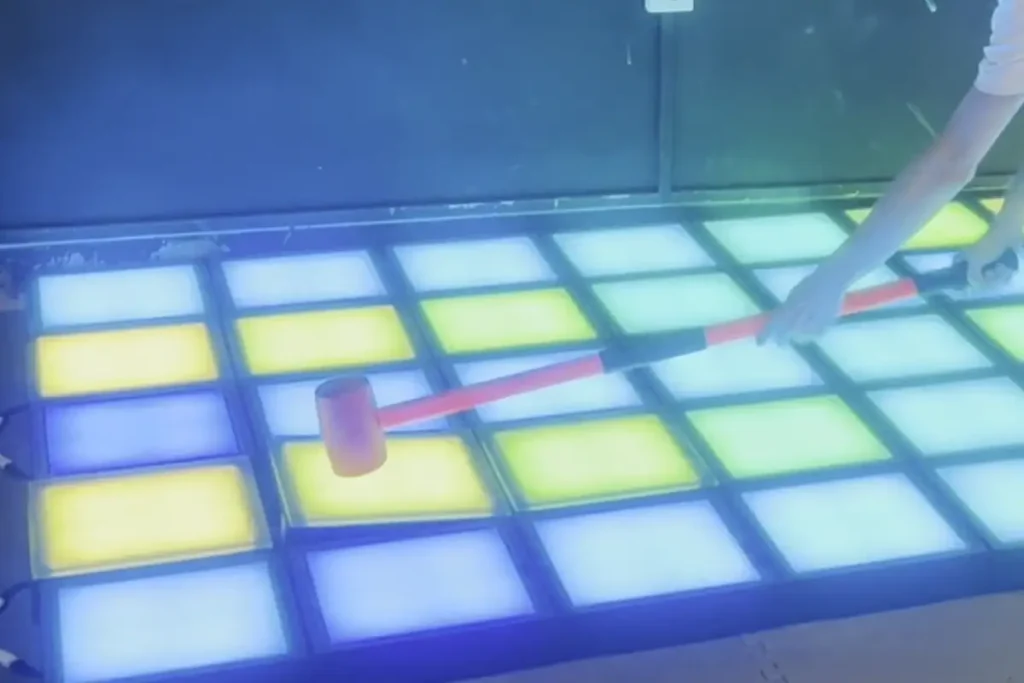
The playing surface is made of modular, load-bearing interactive floor tiles. Each tile is a sealed panel with RGB light sources under a 10 mm tempered glass surface — the glass is the part players walk, jump, and stomp on, directly over the light source. Tiles are the display and the structure: there is no projector, no screen, and no separate image surface. Because each tile works as an independent light cell, it can light a single square, a pattern, or the whole field in different colors at once.
Tiles connect directly to one another with male-female connectors, so the grid is assembled by plugging tiles together rather than by custom electrical wiring on site. Every tile runs on a 24V low-voltage supply — see the power-planning notes in the installation section.
Interactive Game Floor Capacitive Sensing Layer
Every tile uses capacitive sensing. When a player’s foot touches the tile, the contact changes the capacitance and the tile emits an induction signal that travels back to the controller — that is what makes it interactive rather than just a light show.
Each tile detects input at the module level, allowing the controller to identify which square has been activated. Unlike camera-based tracking, which estimates player positions from images, this approach detects interaction through the floor itself. Actual detection performance depends on sensor design, installation conditions, and system configuration.
Why Per-Tile Sensing Beats Camera Tracking
Camera systems estimate a player’s position from a ceiling view, which can be thrown off by lighting or fast movement. A capacitive system reports the exact tile that was stepped on, giving the game software a direct, reliable link between a step and a lit square.
The Interactive Game Floor Central Controller
A controller cabinet is the brain of the system. It connects to every tile, runs the game software, and orchestrates the whole grid in real time: it reads the induction signals from the tiles, applies the active game’s rules, and sends new light commands back out — which square turns red, which turns green, which one just scored. Scoring, sound, timers, and game modes all live in the controller.
How a Step Triggers the Response
From the player’s view it feels instant. Under the hood, the loop runs continuously:
- A player steps on a tile.
- The tile’s sensor registers the press and sends the event to the controller.
- The game logic checks the event against the active game: is it the right color, the right moment, or the correct sequence?
- The controller updates the floor, triggers the next target, records the score, and plays the appropriate sound effect.
The whole loop completes in a fraction of a second. Responsiveness is engineered at the factory level — sensor sensitivity, controller processing, and tile communication speed — which is why it is worth asking any supplier how the system handles input latency under a full grid with many players at once. Note that every player wears different shoes, and some have very thick soles that reduce sensing sensitivity, so we recommend a high-sensitivity Interactive Game Floor product for reliable detection.
Signal flow: Player steps → tile senses (capacitive) → controller runs game logic → tile lights up / scores.
Wall and Room Integration
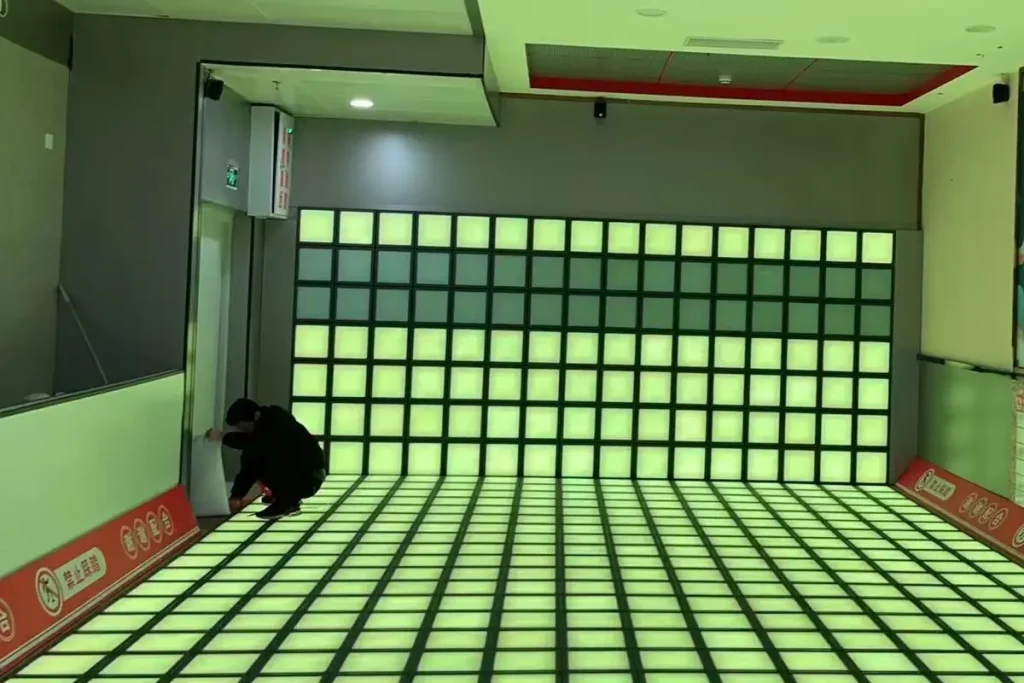
In a full active-game room, the LED tile grid is paired with the same LED tile product on the wall. The wall uses the identical tiles as the floor — the wall version is added to make the game more fun, giving targets and effects a second surface to play across. Because floor and wall are the same product, they connect to the same controller ports and are driven by one controller and one computer, sharing the same game software — and the whole room becomes one coordinated play field: a game can push targets up the wall while the player runs between floor tiles. When you plan a room, this is a configuration choice within one product family, not two separate attractions bolted together.
Interactive Game Floor Game Modes
A production system ships with a game library run from the controller, for example:
Target Chase
Tiles light up one by one; players hit them before they switch off.
Color Match
“Step only on green” style reaction games that train speed and attention.
Sequence Memory
The floor plays a color pattern; players repeat it in order.
Head-to-Head Races
Two halves of the floor, two players or teams, live scoring.
Free Play and Ambience
Relaxed modes for younger kids or open-party sessions.
Before purchasing, ask which games are included, how software updates are delivered, and whether additional game modes or customized content are supported. These details show how the attraction can keep evolving after installation and stay fresh for repeat visitors.
Installing the Tile Grid
The tile grid is a modular, plug-together install — tiles link with male-female connectors, so it goes together on site without bespoke wiring. A buyer should still plan for:
Subfloor and Layout Preparation
The grid needs a flat, level base; tiles sit at a fixed height. The floor is built from standard tiles, so room shapes, islands, and borders are configured at the layout stage, not improvised on site.
Power, Cabling and Controller Placement
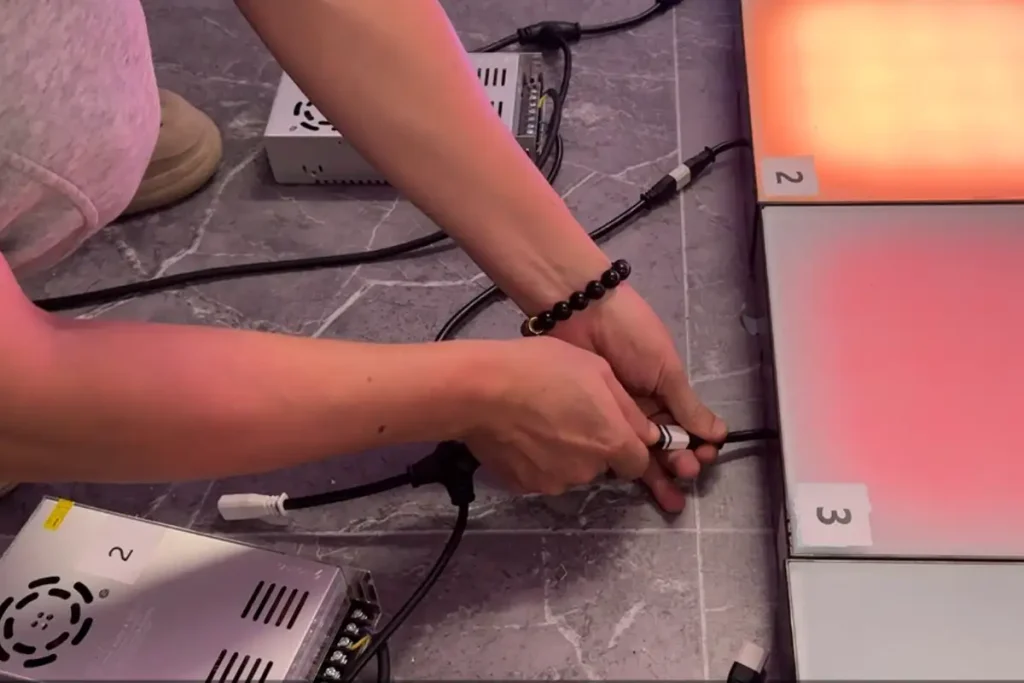
Tiles connect to the controller by quick-plug (male-female) links, and the whole grid runs on a 24V low-voltage supply. Plan the single controller cabinet location together with the room layout. Leave roughly 20 cm of clearance on one side of the floor to route the extension cables that feed 24V power to the grid — do not assume the built-in ~3 m cable reach lets you fill the entire floor edge-to-edge without a power plan.
Walkable Durability of the LED Tiles
Tiles carry a 10 mm tempered-glass top surface built for foot traffic, including shoes.
Maintaining the System
A tile grid is maintained per-tile: if one cell fails, that module is swapped and the grid keeps running. The controller is a single serviceable unit. When comparing suppliers, ask three questions: how a failed tile is replaced, whether spare tiles ship with the order, and how the game library is updated after purchase.
Before ordering, confirm whether individual tiles can be replaced without dismantling a large section of the grid. Also check whether replacement modules require software pairing, configuration, or sensor testing after installation. The service procedure depends on the hardware design, so it is worth confirming with the manufacturer before the system is installed.
What Buyers Should Know
You are not buying a “light-up dance floor” and you are not buying a projector — you are buying a tiled sensing-and-light platform managed by a controller and a game library. Specify the room first, agree on the game library and controller capability second, and check the per-tile service model before you sign. That is what decides whether the attraction still runs at full capacity years after opening.
Frequently Asked Questions
Do interactive game floors need a projector?
No. The surface is made of load-bearing RGB LED tiles, not a projected image. Each tile lights itself, so there is no projector, no screen, and no separate image surface to calibrate.
How does an interactive floor detect a step?
Every tile uses capacitive sensing. When a foot touches the 10 mm tempered-glass top, the contact changes capacitance and the tile sends an induction signal to the central controller — that is what makes the floor interactive rather than just decorative.
Can the same tiles go on the wall too?
Yes. The wall uses the identical LED tile product as the floor, added to make games more fun by giving targets a second surface. Floor and wall run on one controller and one game library.
How durable is an interactive game floor?
Tiles carry a 10 mm tempered-glass walking surface built for foot traffic including shoes. If one cell fails, that module is swapped and the grid keeps running.
What games come with the system?
A production system ships with a game library run from the controller — target chase, color match, sequence memory, head-to-head races, and free-play modes. Ask which games are included and how updates are delivered.
How much space does an interactive game floor need?
It is built from standard modular tiles on a flat, level subfloor, so room shape, islands, and borders are set at the layout stage. Plan the grid size and the controller location together with the room layout.
Explore the Product Range
This article is about one product — the Interactive Game Floor (walkable LED tiles + central controller + game library). It is the core attraction of an active-game room.
To extend the same room, VictorActivate also makes complementary active-game attractions that can be added around the floor as optional extras:
- Interactive LED Climbing Wall — wall-mounted active game
- Interactive Laser Maze — maze attraction for the same room
- Interactive Ball Pipe Wall — wall game system
- Interactive Hoops Game — LED basketball attraction
These are add-ons, not the subject of this guide.
Related reading (Interactive Game Floor): Projection vs LED interactive floor, Interactive game floor buyer’s checklist, How to lay out an interactive gaming room.